
Call of Duty 4 VR
Call of Duty 4 (2007) in VR, standalone on Meta Quest via WinlatorXR.
About
KisakCOD VR with a WinlatorXR XrAPI backend: Call of Duty 4: Modern Warfare (2007) in VR, standalone on a Meta Quest, with no PC and no OpenXR or SteamVR runtime.
Beta 0.2 runs on WinlatorXR Dawn with a ready-made container profile. Tested on Quest 3 with dawn-33 at 2388×1080: Crew Expendable runs at about 26–50 fps, menus and videos at 72.
Features
- Stereo rendering with head and controller tracking, paced to the headset's frame rate
- Physical weapon handling: aiming, two-hand grip, magazine reloads and belt grenades
- Physical scope (experimental): scoped weapons get a magnified view on a round lens on the optic
- Menus and cinematics on a screen fixed in the room, navigated like a gamepad
- Campaign played from the intro through F.N.G. into Crew Expendable
Manual
Installation
- Copy your COD4 folder (the one with
iw3sp.exe) to the headset asDownload/CallOfDuty4. - Dawn: unzip
KisakCOD-VR-WinlatorXR-Dawn-v0.2.0-beta.1.zipstraight into that folder and import the included.wxrprofile.jsoncontainer profile (screen 2388x1080, DXVK 1.10.1, Turnip wrapper, Box64 Performance). SeeREADME_DAWN.txt. - cats-27: unzip
KisakCOD-VR-WinlatorXR-v0.2.0-beta.1.zipinto that folder and set the container up by hand (screen 2388x1080, DXVK, Turnip, XR API on, driveD:=/sdcard/Download). SeeREADME-FIRST.txt. - Create a shortcut for
wine C:\windows\system32\cmd.exewith the arguments/c D:\CallOfDuty4\Launch-KisakCOD-VR-WinlatorXR.bat, or use the includedCallOfDuty4-VR.desktop. - Start it with the headset on. The first start compiles shaders and takes a while.
- Updating from Beta 0.1: replacing
KisakCOD-sp.exeis enough.
Good to know
- The physical scope is new and still needs confirming on every scoped weapon.
- No manual recenter for the virtual screen.
- WinlatorXR's right-stick-click menu can switch back to a flat window; click again to return to VR.
- Quest 2 and Pico are untested.
Controller mapping
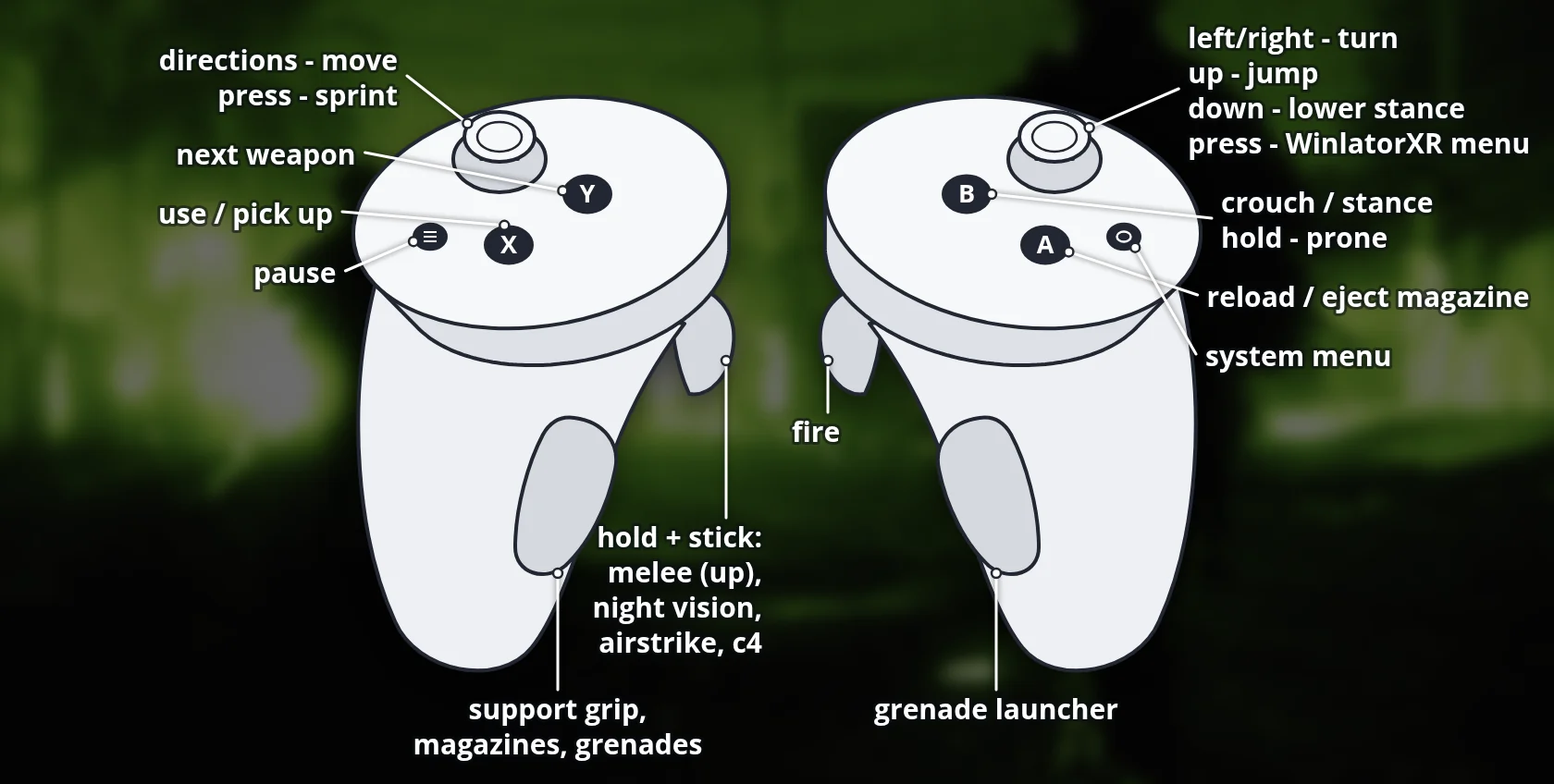
| Action | Button |
|---|---|
| Fire | Right trigger |
| Use / pick up | X |
| Reload / eject magazine | A |
| Crouch / stance | B |
| Next weapon | Y |
| Pause | Menu |
| Support grip, magazines, grenades | Left grip |
| Grenade launcher | Right grip |
| Sprint | Left stick click |
| Melee | Left trigger + left stick up |
| Night vision, airstrike, C4 | Left trigger + left stick down / left / right |
Reloading is physical: eject with A, take a fresh magazine from the off-hand hip with the left grip and release it at the magazine well. In menus the left stick moves the selection, A confirms and B goes back. The right stick click is left free for WinlatorXR's menu.
Download
Install from your browser
Over USB, for Meta Quest 3: installs or updates WinlatorXR, copies your own Call of Duty 4 folder and unpacks the VR mod into it. It checks for the newest WinlatorXR release (WinlatorXR-dawn-42.apk) first. USB install works in Chrome or Edge on a PC or Mac. On the headset, open this page in the Meta Quest Browser to download WinlatorXR and the mod directly.
The installer needs JavaScript. Use the manual download below.
First time? Before you start
- Turn on developer mode: Meta Horizon app on your phone → Devices → your headset → Headset settings → Developer mode.
- Connect the headset to this computer with a USB cable that carries data (not a charge-only cable).
- Close SideQuest and Meta Quest Developer Hub. If you use adb, run
adb kill-serverfirst: only one program can talk to the headset at a time. - Windows: if the headset doesn't show up in the list, install the Meta Quest ADB driver.
- After pressing Connect, put on the headset and allow USB debugging for this computer.
- Copying a game folder takes a few minutes for big games; keep the headset plugged in and awake.
KisakCOD VR WinlatorXR beta 0.2.0-beta.1 latestv0.2.0-beta.1 · 06 Oct 2026
All releases: github.com/SgtBilko76/CallOfDuty4_VR/releases
Need help or found a bug? Ask in #support on our Discord, and get new releases in #new-releases.
Join the DiscordCredits: Based on KisakCOD VR and KisakCOD. Contains no Call of Duty game data. Photo: night patrol, U.S. Army photo by Staff Sgt. Jason Bailey (public domain).